Friday, August 11, 2017


Friday, August 4, 2017
Animation, Visual Effects, Gaming and Comics(AVGC) Sector in India
Online gaming is a rising sector in India. There are more people interested in game development and with increasing quality of engineers passing out each year, it is just a matter of time before India becomes a major powerhouse of gaming and animation. Everyone I meet talks of making android games.
It is said that majority of the work happening in the country is low end. We still lack in quality of gaming professionals.
There are is a lot of talent esp artistic talent. Numbers that I read are like gaming industry was worth more than 1 billion dollars in 2012. Karnataka itself has about 20 animation and gaming training institutes with more than 60 campuses training about 10,000 students at any time. This sector is a ripe area for collaboration between major engineering colleges and such run of the mill Institutes running on rented premises.
There is lot of scope for joint projects/infrastructure sharing and joint diploma courses. Launching high end game titles require years of experience in algorithms, computer graphics as well as art. Software industry is nearing stagnation and revenue growth has slowed. Young software engineers may not be suitable in AVGC Industry as they may not possess requisite skills.
We cannot foresee an electronic arts(EA),Adobe or Pixar kind of company to germinate in India at the moment but there are ominous signs of such a possibility in the future.
Friday, July 7, 2017
Install NetBeans and configure for run Java OpenGL
This is dead easy.
1)Install NetBeans and in it create a project.
2)Download these Jars(assuming you are using windows).
3) On the library folder right click and click add Jar/folder in the popup menu.
4) Add gluegen-rt.jar and jogl-all.jar files to the library.
There you go you can run jogl programs in this project. Only thing is you need to do this for every project.
1)Install NetBeans and in it create a project.
2)Download these Jars(assuming you are using windows).
3) On the library folder right click and click add Jar/folder in the popup menu.
4) Add gluegen-rt.jar and jogl-all.jar files to the library.
There you go you can run jogl programs in this project. Only thing is you need to do this for every project.
Install eclipse and configure it for Java OpenGL
When I was born, I knew
nothing - anonymous
JRE library is required to run Eclipse so install JRE latest version.
·
Download
a JogAmp library
If you haven't done so
already, download and extract the JogAmp library you want to use.
For example, to download and
extract JOGL, see the following instructions
1) Go to the site http://jogamp.org/deployment/jogamp-current/archive/jogamp-all-platforms.7z
and download should automatically start. The zipped archive is about 54MB. If
you are short of data balance, better to get the library (zipped file) from a
friend.
2) Unzip the .7z file
which is a zipped(compressed) file.
3) Only two jar files are
all that is needed from this archive. They are glugen-rt.jar and jogl-all.jar.
4) If you are only working in windows download only these four jar files from my gdrive
4) If you are only working in windows download only these four jar files from my gdrive
·
Eclipse
IDE project
Probably the simplest way
to use JOGL in an Eclipse project is to create another Eclipse project to
contain the JOGL JARs, then make your project depend on this new JOGL project.
In the example below, I include only the 64-bit Windows native JARs, but you
can put native JARs for as many platforms as you wish together into the JOGL
Eclipse project.
1) Create a JOGL project
Put all the JOGL code
JARs, native JARs for all platforms you wish to support, and source ZIP files
in a directory called "JOGL" in your workspace directory.
Click "File > New
> Java Project". Type "JOGL" as the project name and click
"Next".
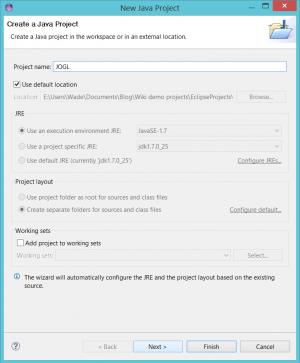
2) Click next and in the
next page go to the tab libraries.
Click on add external
jars. Then navigate to the folder where you have extracted the zip file in the
previous step. In the jogamp-all-platforms folder go to the jar folder and add
the jar files glugen-rt.jar and jogl-all.jar.
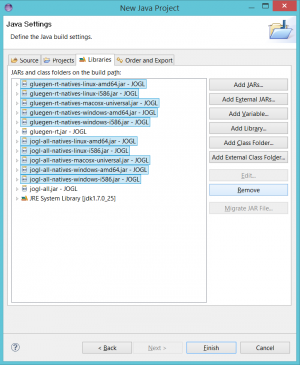
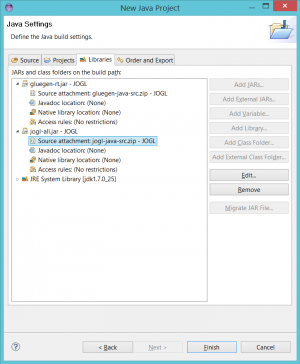
3) Expand the jogl-all and gluegen-rt JARs.
For each of them, double-click "Source attachment", click
"Workspace...", navigate to the corresponding *-java-src.zip file in
the project, select it, click "OK", and click "OK" again to
dismiss the "Source Attachment Configuration" dialog. The JARs should
look like this when you're done:
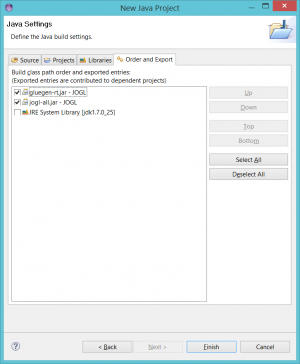
4) Click the "Order
and Export" tab. Check both JOGL JARs, then click "Finish".
5) Create another java
project and add dependency on the JOGL project
Create another project, give a name and
select next. or if you have an existing
project then
Right-click your project and click
"Properties".
Select the "Java Build Path" on
the left, then click the "Projects" tab on the right.
Click the "Add..." button, check
"JOGL", and click "OK".
Your dependent project should look like
this. Click "OK" to dismiss the "Properties" dialog.

That's it! Your project can now use the library.
Wednesday, July 5, 2017
Tetris Game

Tetris is a very popular game among children. It is considered one of the arcade/classical games. An aspiring game developer is recommended to develop a game of Tetris. It is the "Hello World of the Gaming Industry". Wiki page of Tetris says It is a tile-matching puzzle video game, originally designed and programmed by Russian game designer Alexey Pajitnov.
Readers and players would not need any instructions to start playing this one. The Goal? It is to play as long as possible. The game is time based. We would have played this game in our mobiles/consoles since childhood is'nt it.
Developing this game is not as easy as playing it and will test the intelligence of an average coder.
I encountered some problems in rotating the tetris and stacking the tetrises over one another. I am giving a link to my GDrive the code that implements the game of Tetris that I developed. You are welcome to modify the code and I would recommend you give out this code to others too. In the game I developed some problems are yet to be sorted out.
>>>>>Click Here<<<<< for the Code.
If you want to modify my code then you need to
1) Detect the end of the game.
2) Display points scored and create a two level game.
3) Draw the boxes in a better manner may be with borders for each box and some pattern filled inside them.(OO code esp a class to draw each Tetris may be useful here)
4) Delete a completed row at the bottom and increment the points which it does not do.
5) If down arrow is pressed the Tetris should fall by two or more steps.
As a developer it gives me immense displeasure to display "Game Over" and most of the time based games I develop do not have any end. I just let players start the game and play and whatever happens in the end is the untested and un-anticipated part.
Tuesday, July 4, 2017
Tetris in Java OpenGL
The tetris C code has now been ported to Java OpenGL. I did the porting in two sittings of two hours each. It involved quite a lot of changes and I emerged victorious. There was one nagging runtime ArrayIndexOutOfBoundsException which caused a lot of testing time to be wasted.
Here is the code.
Snapshot:

Here is the code.
Snapshot:

Subscribe to:
Comments (Atom)