Sunday, July 27, 2014

Scenario Based Nature

A Satyendra and MB Vinay the credits go to them. The code given here is a compressed file. Uncompress it using some software into a folder. Copy that folder. Then in eclipse create a C++ project and paste this folder inside that project. Set the project properties and off you go.

You should get this snapshot:


Here is the source.

Egg Game

Project by Jyothi SV and Vaishnavi R. Good improvisation. Mouse position controls the location of the basket. Newton's apple was a similar project but i am still including this.

Snapshots:
This is the initial Screen:
 Here the egg does not fall into the basket.

Here the egg goes into the basket. Points need to be increased but that does not happen in this project. Only level is shown.

Here is the source. Instead of going on posting projects created by students if i take the effort in explaining how these were created in the first place i feel i would be doing a great service. That is actually what i will be doing. I hope i have sufficient time for that. I will be explaining Brainvita first so giving a link here for easy browsing.

Paper Fold and Unfold

This is a project on folding a paper sheet also called as Origami in japanese.

This is an art itself. Paper folded and cut at several places yields good design when opened. This can be done in a program.

In this project by Pankaj Datta and Aditya Raj the paper is folded and made into a paper rocket. The rotation of the sheet of paper can be toggled.

Snapshot:


Here is the code. Modifications to the code include using a different sized paper. or folds at other places.

Friday, June 27, 2014

Waves on a water surface

This project was sent to me by a student in belgaum via FB. It was his end sem project.
The crux of the code is in the function fnc()...
// variable stp is initialized to 1 hence the mesh is having 300 horizontal and vertical lines
// MAX is 300
// for every intersection of x , y
// rpl and nrm are two arrays with ripple values of the mesh and the normal to the wave

void fnc()
{
int i,j;
double x,y,z,w;

w=-MAX*stp/2.0;    // this works out to -150

for (i=0;i<MAX;i++)    // i varies from 0 to 299
{
y=w+(double)i*stp;       // this y varies from -150 to 150

for (j=0;j<MAX;j++)     // j varies from 0 to 299
{
x=w+(double)j*stp;       // this x varies from -150 to 150

z=2.0*sin((x*x+y*y-phase)/100.0);   // this is the sin wave which gives this mesh its wavey nature
                                         // for more refer=> Link
rpl[i][j][0]=x;
rpl[i][j][1]=y;
rpl[i][j][2]=z;       // z is the height field or the height of the wave
}
}
}

Here is the snapshot.

Here is the code.

I had modified the code and took this snapshot where the mesh is being drawn using line strip.

Modification Snapshot:

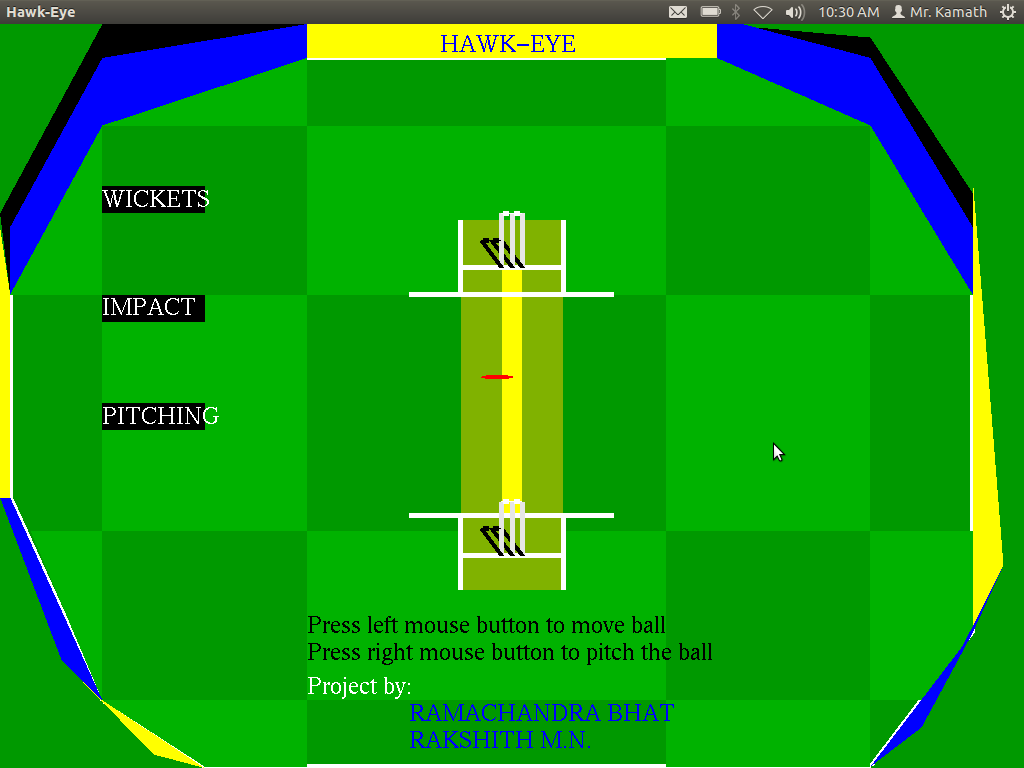
Hawk Eye

This project by ramachandra and rakshit is about animating motion of the ball going and hitting the wicket.

Here are the snapshots:


Here is the code. Remember this is a c++ project. It runs on Ubuntu platform with opengl libraries added.

Sinking Ship

Namratha and sweekruthi worked on this existing project. The modification done to the sinking ship project that has been done is the ice berg becomes two pieces... both the pieces move down and sink.

Here are the snaps:
Moving....
 Collison....

 Pieces of iceberg and ship sinking....


I just want to add something to explain how this pieces of ice cube and their rotation was achieved.

Here is the code which does the trick.
/* TO DRAW ICEBERG */
void ice()
{
    glPushMatrix();
    glTranslated(450,50,0.0);
    glScaled(10,10,0);
    glColor3f(0.0,1.0,1.0);
    if(c>0)                          // This flag is used to indicate if ice berg is
    {glPushMatrix();          // intact or split into two after collision
    glTranslated(0,x,0);      //move the ice bergs down all the while rotating them.
    glPushMatrix();
    glTranslated(7,2,0.0);
    glRotated(-x,0,0,1);      // clockwise for the right piece.
    glTranslated(-7,-2,0.0);
    glBegin(GL_POLYGON);
        glVertex2f(7,2);
        glVertex2f(8,3);
        glVertex2f(11,18);
        glVertex2f(12,19);
        glVertex2f(12,3);
        glEnd();
        glPopMatrix();
        glPushMatrix();

        glTranslated(12,3,0.0);
        glRotated(x,0,0,1);           // anti clock wise for the left piece.
        glTranslated(-12,-3,0.0);
        glBegin(GL_POLYGON);
        glVertex2f(12,3);
        glVertex2f(12,19);
        glVertex2f(17,18);
        glVertex2f(18,3);
        glVertex2f(19,3);
        glEnd();
        glPopMatrix();
        glPopMatrix();
    }
    else                                 // if ice berg is intact draw one piece
    {                                     // without any transformations
        glBegin(GL_POLYGON);
            glVertex2f(7,2);
            glVertex2f(8,3);
            glVertex2f(11,18);
            glVertex2f(12,19);
            glVertex2f(12,3);
            glEnd();
            glBegin(GL_POLYGON);
            glVertex2f(12,3);
            glVertex2f(12,19);
            glVertex2f(17,18);
            glVertex2f(18,3);
            glVertex2f(19,3);
            glEnd();
    }
    glPopMatrix();
}
The variable c is global and it is set in the display function
like this...
    if(b>250)
    {

        c+=10;
        display3();

    }
Here is the complete code.

Simulation of Train

Kudos to Kusuma V(1CE11CS025)... This is her original creation. I have been trying to get adsense work on this blog but they have issues with plagiarized content. So am trying to post original projects of our students.

There are three trains which move on a track. The wheels rotate and they all move one after the other out of view.

Here are a few snapshots.


Here is the link to the code.