Saturday, May 4, 2013

Project Report Guidelines- Computer Graphics and Visualization-VTU


CITY ENGINEERING COLLEGE
Department of Computer Science & Engineering
FORMAT FOR  GRAPHICS PROJECT REPORT

Project Report:

Each student is required to write a comprehensive report about the project. The report should consist of 25 to 30 pages describing the project. The report should be in the format as described below. It is important that you adhere to these guidelines. Three copies of the report (hard copy only) should be submitted. One college copy and two individual copies. A CD/DVD consisting of working code and the soft copy of the project report should also accompany the Report.

1. ARRANGEMENT OF CONTENTS:
The sequence in which the project report material should be arranged and bound should be as follows:
1. Cover Page & Certificate  Page
2. Abstract
3. Acknowledgment
4. Table of Contents
5. List of figures and tables
(i)                  Introduction
(ii)                Literature survey
(iii)  Software,Hardware and Functional Requirements
(iv)    Analysis and Design
(v)               Implementation
(vi)    Discussions and Snapshots
(vii)                   Conclusion and Future Scope
(viii)                 Bibliography
(ix)    Appendices-full code in a very small font size and single line spacing(as few pages as
                                                                                                                                possible)

2. PAGE DIMENSION AND BINDING SPECIFICATIONS:
The dimension of the seminar report should be in A4 size. The project report should be bound with Spiral binding and cream color cover.

3.TYPING INSTRUCTIONS:
One and a half line spacing should be used for typing the general text. The general text shall be fully justified and typed in the Font style ‘Times New Roman’ and Font size 12. Subheading shall be typed in the Font style ‘Times New Roman’ and Font size 14 and bold(no underline). Heading shall be typed in the Font style ‘Times New Roman’ and Font size 16 and bold, Chapter name shall be typed in the Font style ‘Times New Roman’ and Font size 18 and bold(center alignment).  Chapter Number shall be typed in the Font style ‘Times New Roman’ and Font size 16 and bold (right alignment).
Header  (left side Chapter name font size 10 style:Italics), Footer (left: Dept. of CSE,CEC center:2012-2013 right: page no). Abstract, acknowledgement, Table of contents, List of figures and tables should have roman page numbers written at bottom (center) page.
Page Margins: Right:”1”, Left:”1.25, Top:”0.75”, Bottom:”0.75”
The chapters, sections, subsections may be numbered in the decimal form for e.g. chapter 2, sections as 2.1, 2.2 etc., and sub sections as 2.1.1, 2.2.2, 2.2.3 etc.
4. PREPARATION FORMAT:
4.1 Colour of the outer cover: CREAM
4.2 Cover Page & Certificate Page
4.3 Abstract
Abstract should be one page synopsis, it should summarize the aims, conclusions and  implications of your project.

4.4 Table of Contents

The table of contents should list all material following it as well as any material, which precedes it. The page numbers of which are in lower case Roman letters. One and a half spacing should be adopted for typing the matter under this head.

4.5 Chapters organization
(x)                Introduction
(xi)              Literature survey
(xii)                        Software,Hardware and Functional Requirements
(xiii)                 Analysis and Algorithm Design
(xiv)                 Implementation(with code snippets)
(xv)                   Discussions and snapshots
(xvi)                 Conclusions and Future Scope
(xvii)               Bibliography
(xviii)             Appendices-full code in a very small font size and single line spacing(as few pages as
                                                                                                                                  possible)

4.6 List of References

The references should be numbered in the order they are used in the report. The name of the author/authors should be immediately followed by the year and other details.

 3.6 Appendices

Appendices are provided to give supplementary information, which is included in the main report. 

A typical illustrative list given below relates to the citation example quoted above. Don't include same references.

 REFERENCES(Example format of references)

[1]. Ariponnammal, S. and Natarajan, S. (1994) ‘Transport Phonomena of Sm Sel – X Asx’,                         Pramana – Journal of Physics Vol.42, No.1, pp.421-425.

[2]. Barnard, R.W. and Kellogg, C. (1980) ‘Applications of Convolution Operators to Problems    in Univalent Function Theory’, Michigan Mach, J., Vol.27, pp.81–94.

[3]. Shin, K.G. and Mckay, N.D. (1984) ‘Open Loop Minimum Time Control of Mechanical Manipulations and its Applications’, Proc.Amer.Contr.Conf., San Diego, CA, pp. 1231-1236.

* * * * *
These guidelines are for sample only.
Download Project Report Guidelines and Other Documents.
Download Old Project Reports.

Sunday, April 28, 2013

To display a set of {fij} values as a rectangular mesh

10. Program to display a set of values {fij} as a rectangular mesh.

#include<GL/glut.h>
#include<stdio.h>
static  GLdouble  viewer[]={0,0,5};
int  m, n;
void rectmesh( int  m, int  n)
{
            int  i, j;
            for(i=0;i<m;i++)
            for(j=0;j<n;j++)
            {
            glBegin(GL_LINE_LOOP);
            glVertex2i( i, j);
            glVertex2i( i+1, j);
            glVertex2i( i+1, j+1);
            glVertex2i( i, j+1);
            glEnd();
            }
}
void display()
{
            glClear(GL_COLOR_BUFFER_BIT);
            glLoadIdentity();
            gluLookAt(viewer[0],viewer[1],viewer[2],0,0,0,0,1,0);
            glTranslated(0,0,-5);
            glColor3f(0,0,0);
            rectmesh( m, n);
            glFlush();
}
void myReshape(int w,int h)
{
            glViewport(0,0,w,h);
            glMatrixMode(GL_PROJECTION);
            glLoadIdentity();
            glOrtho(-2,20,-2,20,-10,20);
            glMatrixMode(GL_MODELVIEW);
}
int main(int argc,char **argv)
{
printf(“enter m & n:”);
scanf(“%d%d”,&m,&n);
glutInit(&argc,argv);
glutInitDisplayMode(GLUT_SINGLE|GLUT_RGB|GLUT_DEPTH);
glutInitWindowSize(500,500);
glutInitWindowPosition(0,0);
glutCreateWindow(“Rectangular Mesh”);
glutDisplayFunc(display);
glutReshapeFunc(myReshape);
glClearColor(1.0,1.0,1.0,1.0);
glutMainLoop();
return 0;
}

Saturday, April 27, 2013

Scanline-Area Filling Algorithm

9. program to fill any given polygon using scanline-area filling algorithm.

Exams approaching and it is tough to get someone to explain the code to you.... Here are some comments to understand the code.

Scan-line area filling uses the property of coherence to color the polygon. Scanline coherence means if a point lies inside a polygon then other points lying on the same scanline near to it are also likely to be inside the polygon.

There are various ways to check if a point is inside the polygon or not. If somehow all pixels lying inside are found out then it is just a matter of changing their pixel value to color the polygon.

In this program it uses two arrays le and re denoting left edge and right edge. They span the entire window height(500-array size) and store the position(x value) of the intersection point of the scan line with one of the edges of polygon(either left or right).

Initial values in le array is 500. That of re array is 0. We scan convert individual edges of the polygon and each point on the edge, its x value goes to the correct le or re array.

Finally once le and re arrays are populated we draw a line from the left edge to the right edge in a loop and iterate over the entire window region(all 500 scanlines).

#include<stdio.h>
#include<GL/glut.h>
GLfloat x1,y1,x2,y2,x3,y3,x4,y4;
void edgedetect(GLfloat x1,GLfloat y1,GLfloat x2,GLfloat y2,int *le,int *re)
{
            float mx,x,temp;
            int i;
            if((y2-y1)<0)    // if second point is below first point interchange them
            {
              temp=x1;x1=x2;x2=temp;
              temp=y1;y1=y2;y2=temp;
            }
              if((y2-y1)!=0)      // if denominator is zero we can't find slope
                        mx=(x2-x1)/(y2-y1);
            else
                        mx=x2-x1;    // y2-y1=0 implies line is horizontal
            x=x1;
            for(i=y1;i<y2;i++)        // starting from x1,y1 add slope mx to x
            {                                  // and round it to find the next point on the
                                                // line. For that particular scan line i
                        if(x<le[i])         // insert the x value into either le or re.
                                    le[i]=x; // Initially both le and re will contain same
                                                // value...
                        if(x>re[i])         // in the next time for the other edge
                                    re[i]=x; // either le or re will change
                        x+=mx;            // NOTE: le and re are integer arrays and x
            }                                  // is float so automatic type conversion.
}
void drawpixel(int x,int y)
{
            glColor3f(0.0,1.0,1.0);
            glBegin(GL_POINTS);
            glVertex2i(x,y);
            glEnd();
}
void scanfill(float x1,float y1,float x2,float y2,float x3,float y3,float x4,float y4)
{
            int le[500],re[500];
            int i,y;
            for(i=0;i<500;i++)   // initialize le and re array values
            {
                        le[i]=500;
                        re[i]=0;
            }
            edgedetect(x1,y1,x2,y2,le,re);    // call edge detect four times
            edgedetect(x2,y2,x3,y3,le,re);    // once for each edge.
            edgedetect(x3,y3,x4,y4,le,re);
            edgedetect(x4,y4,x1,y1,le,re);
for(y=0;y<500;y++)        // for every scan line with value y
{
           if(le[y]<=re[y])            // refer to le and re arrays to see if a part
                        for(i=le[y]+1;i<re[y];i++) // of the scanline is inside polygon
                                    drawpixel(i,y);       // if so draw a horizontal line from
}                                                              // left edge to right edge
}
void display()
{
            glClear(GL_COLOR_BUFFER_BIT);
            x1=200,y1=200,x2=100,y2=300,x3=200,y3=400,x4=300,y4=300;
            glBegin(GL_LINE_LOOP);       // draw the boundary of the polygon
            glVertex2f(x1,y1);                   // to be filled.
             glVertex2f(x2,y2);
            glVertex2f(x3,y3);
            glVertex2f(x4,y4);
    glEnd();
   scanfill(x1,y1,x2,y2,x3,y3,x4,y4);       // call scanfill to fill the polygon
   glFlush();   // Usually students fail the lab because they forget glFlush.
}
void myinit()
{
            glClearColor(1.0,1.0,1.0,1.0);
            glColor3f(0.0,0.0,1.0);
            glPointSize(1.0);
            glMatrixMode(GL_PROJECTION);
            glLoadIdentity();
            gluOrtho2D(0.0,499.0,0.0,499.0);
}
int main(int argc,char **argv)
{          glutInit(&argc,argv);
            glutInitDisplayMode(GLUT_SINGLE|GLUT_RGB);
            glutInitWindowSize(500,500);// 500 height is hardcoded
            glutInitWindowPosition(0,0);
            glutCreateWindow("scanfill");
            glutDisplayFunc(display);
            myinit();
            glutMainLoop();
            return 0;
   }

To draw a color cube and allow the user to move the camera


8.  Program to draw a color cube and allow the user to move the camera suitably to experiment with  perspective viewing using OpenGL functions.
 
#include<stdlib.h>
#include<GL/glut.h>
GLfloat vertices[][3] = {{-1.0,-1.0,-1.0},{1.0,-1.0,-1.0},{1.0,1.0,-1.0},{-1.0,1.0,-1.0},{-1.0,-1.0,1.0},{1.0,-1.0,1.0},{1.0,1.0,1.0},{-1.0,1.0,1.0}};
GLfloat normals[][3] = {{-1.0,-1.0,-1.0},{1.0,-1.0,-1.0},{1.0,1.0,-1.0},{-1.0,1.0,-1.0},{-1.0,-1.0,1.0},{1.0,-1.0,1.0},{1.0,1.0,1.0},{-1.0,1.0,1.0}};
GLfloat colors[][3] = {{0.0,0.0,0.0},{1.0,0.0,0.0},{1.0,1.0,0.0},{1.0,1.0,0.0},
{0.0,0.0,1.0},{1.0,0.0,1.0},{1.0,1.0,1.0},{0.0,1.0,1.0}};
void polygon(int a, int b, int c, int d)
{
            glBegin(GL_POLYGON);
            glColor3fv(colors[a]);
            glNormal3fv(normals[a]);
            glVertex3fv(vertices[a]);
            glColor3fv(colors[b]);
            glNormal3fv(normals[b]);
            glVertex3fv(vertices[b]);
            glColor3fv(colors[c]);
            glNormal3fv(normals[c]);
            glVertex3fv(vertices[c]);
            glColor3fv(colors[d]);
            glNormal3fv(normals[d]);
            glVertex3fv(vertices[d]);
            glEnd();
}
void colorcube()
{           polygon(0,3,2,1);
            polygon(2,3,7,6);
            polygon(0,4,7,3);
            polygon(1,2,6,5);
            polygon(4,5,6,7);
            polygon(0,1,5,4);
}
static GLfloat theta[] = {0.0,0.0,0.0};
static GLint axis =2;
static GLdouble viewer[] = {0.0,0.0,5.0};
void display(void)
{
            glClear(GL_COLOR_BUFFER_BIT|GL_DEPTH_BUFFER_BIT);
            //update viewer position in modelview matrix
  glLoadIdentity();
  gluLookAt(viewer[0],viewer[1],viewer[2],0.0,0.0,0.0,0.0,1.0,0.0);
  //rotate cube
  glRotatef(theta[0],1.0,0.0,0.0);
  glRotatef(theta[1],0.0,1.0,0.0);
  glRotatef(theta[2],0.0,0.0,1.0);
   colorcube();
   glFlush();
   glutSwapBuffers();
}
void mouse(int btn, int state, int x,int y)
{
   if(btn==GLUT_LEFT_BUTTON && state == GLUT_DOWN)              axis=0;
   if(btn==GLUT_MIDDLE_BUTTON && state == GLUT_DOWN)        axis=1;
   if(btn==GLUT_RIGHT_BUTTON && state == GLUT_DOWN)           axis=2;
   theta[axis] += 2.0;
   if(theta[axis]>360.0)theta[axis]-=360.0;
   display();
}
void Keys(unsigned char key, int x,int y)
{
            // use x, X,y,Y,z and Z keys to move viewer
            if(key =='x') viewer[0]-=1.0;
            if(key =='X') viewer[0]+=1.0;
            if(key =='y') viewer[1]-=1.0;
            if(key =='Y') viewer[1]+=1.0;
            if(key =='z') viewer[2]-=1.0;
            if(key =='Z') viewer[2]+=1.0;
      glutPostRedisplay();
}
void myReshape(int w,int h)
{
            glViewport(0,0,w,h);
            //use the prespective view
            glMatrixMode(GL_PROJECTION);
            glLoadIdentity();
           if(w<=h)
glFrustum(-2.0,2.0,-2.0*(GLfloat) h/(GLfloat) w, 2.0*(GLfloat) h/(GLfloat) w ,2.0,20.0);
    else
glFrustum(-2.0,2.0,-2.0*(GLfloat) w/(GLfloat) h, 2.0*(GLfloat) w/(GLfloat) h ,2.0,20.0);
  glMatrixMode(GL_MODELVIEW);
}
Int main(int argc,char** argv)
{
            glutInit(&argc,argv);
            glutInitDisplayMode(GLUT_DOUBLE|GLUT_RGB|GLUT_DEPTH);
             glutInitWindowSize(500,500);
            glutCreateWindow("colorcube viewer");
            glutReshapeFunc(myReshape);
            glutDisplayFunc(display);
            glutMouseFunc(mouse);
            glutKeyboardFunc(Keys);
            glEnable(GL_DEPTH_TEST);
            glutMainLoop();
            return 0;
}

Monday, March 4, 2013

Shaded Teapot over a Table

7) Using OpenGL functions write a program to draw a shaded scene consisting of a tea pot on a table. Define suitably the position and properties of the light source along with the properties of the surfaces of the solid object used in the scene.

#include<GL/glut.h>
void wall(double thickness)
{
    glPushMatrix();
    glTranslated(0.5,0.5*thickness,0.5);
    glScaled(1.0,thickness,1.0);
    glutSolidCube(1.0);
    glPopMatrix();
}
void tableLeg(double thick,double len)  // draw one table leg
{
    glPushMatrix();
    glTranslated(0,len/2,0);
    glScaled(thick,len,thick);
    glutSolidCube(1.0);
    glPopMatrix();
}
void table(double topWid, double topThick,double legThick,double legLen)
{
    glPushMatrix();
    glTranslated(0,legLen,0);
    glScaled(topWid, topThick,topWid);
    glutSolidCube(1.0);
    glPopMatrix();
    double dist =0.95* topWid/2.0 - legThick/2.0;
    glPushMatrix();
    glTranslated(dist,0,dist);
    tableLeg(legThick,legLen);
    glTranslated(0.0,0.0,-2*dist);
    tableLeg(legThick,legLen);
    glTranslated(-2*dist,0,2*dist);
    tableLeg(legThick,legLen);
    glTranslated(0,0,-2*dist);
    tableLeg(legThick,legLen);
    glPopMatrix();
}
void displaySolid(void)
{
    GLfloat mat_ambient[] = { 0.7f,0.7f,0.7f,1.0f};// gray
    GLfloat mat_diffuse[] = { 0.7f,0.7f,0.7f,1.0f};
    GLfloat mat_specular[] = { 1.0f,1.0f,1.0f,1.0f};
    GLfloat mat_shininess[]={50.0f};

    glMaterialfv(GL_FRONT,GL_AMBIENT,mat_ambient);
    glMaterialfv(GL_FRONT,GL_DIFFUSE,mat_diffuse);
    glMaterialfv(GL_FRONT,GL_SPECULAR,mat_specular);
    glMaterialfv(GL_FRONT,GL_SHININESS,mat_shininess);

    // set the light sources propertis
    GLfloat lightIntensity[] ={ 1.0f,1.0f,1.0f,1.0f};
    GLfloat light_position[] ={ 2.0f,6.0f,3.0f,0.0f};
    glLightfv(GL_LIGHT0 ,GL_POSITION,light_position);
    glLightfv(GL_LIGHT0 ,GL_DIFFUSE,lightIntensity);

glMatrixMode(GL_PROJECTION);
glLoadIdentity();
glOrtho(-1.33,1.33, -1,1,0.1,100.0);
glMatrixMode(GL_MODELVIEW);
glLoadIdentity();
gluLookAt(2.3,1.3,2.0,0.0,0.25,0.0,0.0,1.0,0.0);
glClear(GL_COLOR_BUFFER_BIT|GL_DEPTH_BUFFER_BIT);
glPushMatrix();
glTranslated(0.4,0,0.4);
table(0.6,0.02,0.02,0.3);
glPopMatrix();
glPushMatrix();
glTranslated(0.6,0.38,0.5);
glRotated(30,0,1,0);
glutSolidTeapot(0.08);
glPopMatrix();
wall(0.02);
glPushMatrix();
glRotated(90.0,0.0,0.0,1.0);
wall(0.02);
glPopMatrix();
glPushMatrix();
glRotated(-90.0,1.0,0.0,0.0);
wall(0.02);
glPopMatrix();
glFlush();
}
int main(int argc, char** argv)
{
    glutInit(&argc,argv);
    glutInitDisplayMode(GLUT_SINGLE|GLUT_RGB|GLUT_DEPTH);
    glutInitWindowSize(640,480);
    glutInitWindowPosition(100,100);
    glutCreateWindow("simple shaded scene consisting of a tea pot on a table ");
    glutDisplayFunc(displaySolid);
    glEnable(GL_LIGHTING);
    glEnable(GL_LIGHT0);
    glShadeModel(GL_SMOOTH);
    glEnable(GL_NORMALIZE);
    glEnable(GL_DEPTH_TEST);
    glClearColor(0.1,0.1,0.1,0.0);
    glViewport(0,0,640,480);
    glutMainLoop();
return 0;
}

Suppose the external asks for changing the color of each wall or table or teapot it can be done easily. Here is a modification to the teapot program=> Click Here

Cylinder and Parallelopiped

6) Write an OpenGL Program to create a cylinder and a parallelepiped by extruding  a circle and quadrilateral respectively. Allow the user to specify the circle and the quadrilateral.

#include<stdlib.h>
#include<GL/glut.h>
#include<math.h>
#define ONERAD 0.0174

float z=0;
void myinit()
{
    glClearColor(1.0,1.0,1.0,0.0);
    glMatrixMode(GL_PROJECTION);
    glLoadIdentity();
    glOrtho(-10,40.0,-10,30.0,-20,20);
}
void drawObjects(float radius,float u,float v)
{float i;
float x1=5,y1=5,x2=15,y2=5,x3=15,y3=15,x4=5,y4=15;

    glPushMatrix();
    glRotatef(30,1,0,0);
    glRotatef(40,0,1,0);
  while(z<10)
   {
   glClear(GL_COLOR_BUFFER_BIT | GL_DEPTH_BUFFER_BIT);
   glColor3f(1.0,0.0,0.0);
   for (i=0; i<360; i+=6)
   {
    glBegin(GL_POLYGON);
    float angle = i*ONERAD;
    glVertex3f(u+cos(angle)*radius,v+(sin(angle))*radius,0);
    angle=(i+6)*ONERAD;
    glVertex3f(u+cos(angle)*radius,v+(sin(angle))*radius,0);
    glVertex3f(u+cos(angle)*radius,v+(sin(angle))*radius,z);
    angle=i*ONERAD;
    glVertex3f(u+cos(angle)*radius,v+(sin(angle))*radius,z);
    glEnd();
   }
   glColor3f(0.0,0.0,1.0);
   glBegin(GL_POLYGON);
   glVertex3f(x1,y1,0);
   glVertex3f(x2,y2,0);
   glVertex3f(x2,y2,z);
   glVertex3f(x1,y1,z);
   glEnd();
   glBegin(GL_POLYGON);
   glVertex3f(x2,y2,0);
   glVertex3f(x3,y3,0);
   glVertex3f(x3,y3,z);
   glVertex3f(x2,y2,z);
   glEnd();
   glBegin(GL_POLYGON);
   glVertex3f(x3,y3,0);
   glVertex3f(x4,y4,0);
   glVertex3f(x4,y4,z);
   glVertex3f(x3,y3,z);
   glEnd();
   glBegin(GL_POLYGON);
   glVertex3f(x4,y4,0);
   glVertex3f(x1,y1,0);
   glVertex3f(x1,y1,z);
    glVertex3f(x4,y4,z);
    glEnd();
   z++;
   glFlush();
   glutSwapBuffers();
    }
  glPopMatrix();
}
void display()
{int j;
    glClear(GL_COLOR_BUFFER_BIT | GL_DEPTH_BUFFER_BIT);
    drawObjects(5.0,0.0,0.0);
   glFlush();
}
int main(int argc,char **argv)
{
    glutInit(&argc,argv);
    glutInitDisplayMode(GLUT_DOUBLE | GLUT_RGB|GLUT_DEPTH );
    glutInitWindowSize(600,600);
    glutCreateWindow("6");
    glutDisplayFunc(display);
    myinit();
    glEnable(GL_DEPTH_TEST);
    glutMainLoop();
return 0;
}

Cohen-Sutherland Line Clipping

5) Write an OpenGL Program to implement the Cohen-Sutherland line-clipping  algorithm. Make provision to specify the input line, window for clipping and view port for displaying the clipped image.
/* So you have come to this page looking for the working of this program in between fb and whatsapp. I may not be an authority on graphics but will try my best to explain in as few sentences as possible.
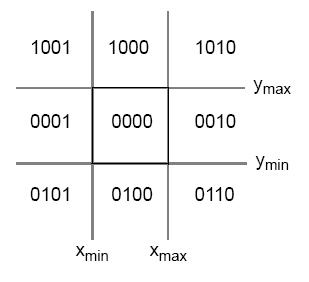
The plane in which the window lies is divided into nine regions each with a different outcode. Outcodes of a point are integers(we use only last four bits) with appropriate bits set/reset to indicate the region in which that point lies.
The advantage of using region codes is that it makes it extremely simple to accept/reject a line which is completely inside/outside a window.
Outcode of two points inside the window is 0000 and 0000 and bitwise OR of these codes yields a zero hence this line can be accepted.
Outcode of two points lying completely on one side of the window either to left or right or top or bottom implies that one bit of both the outcodes is set(1). So a bitwise AND of the outcodes yields a non zero value which indicates that the line is completely on one side and hence rejected.
We need to find the multiple intersection points of a line with the four edges, if it intersects an edge and some part is inside the window.
*/


#include<stdio.h>
#include<GL/glut.h>
#define outcode int

double xmin=50,ymin=50,xmax=100,ymax=100;// Windows boundaries
double xvmin=200,yvmin =200, xvmax=300,yvmax=300; // Viewport boundaries

const int RIGHT= 8; // bit codes for the right
const int LEFT =2;  //bit codes for the left
const int TOP=4;    // bit codes for the top
const int BOTTOM=1; //bit codes for the bottom

outcode ComputeOutCode(double x,double y); // used to compute bit codes of a point

// Cohen -Sutherland clipping algorithm clips a line from
// p0=(x0,y0)  to p1 =(x1,y1) against a rectangle with.
// diagonal from (xmin,ymin)to (xmax,ymax)

void CohenSutherlandLineClipAnddraw(double x0,double y0,double x1,double y1)
{
   // OutCodes for P0 ,P1 and Whatever point(among P0 & P1) lies outside the
   // clip rectangle

    outcode outcode0,outcode1,outcodeOut;

int accept =0,done =0;// These are two bits to indicate trivial accept and/or
                                     // done with clipping
    //compute outcodes
outcode0= ComputeOutCode(x0,y0);
outcode1= ComputeOutCode(x1,y1);

do
{
    if(!(outcode0|outcode1)) // logical or is 0 trivially accept and exit
    { accept=1;
      done=1;
    }

    else
        if(outcode0 & outcode1)  // logical and is 0 trivially reject and exit
             done=1;
        else
        {
            //failed both tests , so calculate the line segment clip;
            // from an outside point to an intersection with clip edge
            double x,y;
            // at least one endpoint is outside the clip rectangle ; pick it.
            outcodeOut= outcode0?outcode0:outcode1;
       
            //now find the intersection point ; slope m= (y1-y0)/(x1-x0)
            // use formula
/// y=y0+slope*(x-x0), //either x is xmin or xmax
/// x=x0+(1/slope)*(y-y0) // y is ymin or ymax


Method to find intersection point

             if(outcodeOut & TOP) //point is above the clip rectangle
   {
x= x0+(x1-x0)*(ymax-y0)/(y1-y0);
                 y=ymax;
             }
           else
if(outcodeOut & BOTTOM) //point is below the clip rectangle
             {
x= x0+(x1-x0)*(ymin-y0)/(y1-y0);
                 y=ymin;
             }
             else
if(outcodeOut & RIGHT) //point is to the right of clip rectangle
             {
y= y0+(y1-y0)*(xmax-x0)/(x1-x0);
                 x=xmax;
         }
             else                   //point is to the left of the clip rectangle
             {
                 y= y0+(y1-y0)*(xmin-x0)/(x1-x0);
                 x=xmin;
             }
// now we move outside point to intersection point to clip
             // and get ready for next pass.
      if(outcodeOut == outcode0) // If the outside point was p0 update x0,y0 to x,y
             { x0=x;                           // so x,y become the new x0,y0
               y0=y;
               outcode0 = ComputeOutCode(x0,y0);
                //compute outcode of new endpoint
             }
        else                            // If the outside point was p1 update x1,y1 to x,y
             {                           // so x,y becomes the new x1,y1
               x1=x;
               y1=y;
               outcode1 = ComputeOutCode(x1,y1);
              // compute outcode of new endpoint
             }
        }
}while(!done);
if(accept) //If line was trivial reject no need to draw viewport
{
         // window to viewport mapping
    double sx=(xvmax-xvmin)/(xmax-xmin);// scale parameter in x direction
    double sy=(yvmax-yvmin)/(ymax-ymin);// scale parameter in y direction
    double vx0 = xvmin+(x0-xmin)*sx;
    double vy0 = yvmin+(y0-ymin)*sy;
    double vx1 = xvmin+(x1-xmin)*sx;
    double vy1 = yvmin+(y1-ymin)*sy;
    //draw a red color viewport
    glColor3f(1.0,0.0,0.0);
    glBegin(GL_LINE_LOOP);
    glVertex2f(xvmin,yvmin);
    glVertex2f(xvmax,yvmin);
    glVertex2f(xvmax,yvmax);
    glVertex2f(xvmin,yvmax);
  glEnd();
glColor3f(0.0,0.0,1.0);
glBegin(GL_LINES);
glVertex2d(vx0,vy0);
glVertex2d(vx1,vy1);
glEnd();
}
}
// compute the bit code for a point (x,y) using the clip rectangle
// bounded diagonally by (xmin,ymin) and (xmax,ymax)
outcode ComputeOutCode(double x,double y)
{
    outcode code =0;
     if(y>ymax)   //above the clip window
         code |=TOP;
    if(y<ymin)   //below the clip window
         code |=BOTTOM;
    if(x>xmax)        //to the right of the clip window
         code |=RIGHT;
    if(x<xmin)  //to the left of the clip window
         code |=LEFT;
         return code;
}
void display()
{
    double x0=120,y0=10,x1=40,y1=130;
    glClear(GL_COLOR_BUFFER_BIT);
    glColor3f(1.0,0.0,0.0); // draw red color lines
     glBegin(GL_LINES);
          glVertex2d(x0,y0);
          glVertex2d(x1,y1);
          glVertex2d(60,20);
          glVertex2d(80,120);
          glEnd();
   glColor3f(0.0,0.0,1.0); // draw a blue colored window
      glBegin(GL_LINE_LOOP);
         glVertex2f(xmin,ymin);
         glVertex2f(xmax,ymin);
         glVertex2f(xmax,ymax);
         glVertex2f(xmin,ymax);
         glEnd();
       CohenSutherlandLineClipAnddraw(x0,y0,x1,y1);
       CohenSutherlandLineClipAnddraw(60,20,80,120);
       glFlush();
}
void myinit()
{
    glClearColor(1.0,1.0,1.0,1.0);
    glColor3f(1.0,0.0,0.0);
    glPointSize(1.0);
    glMatrixMode(GL_PROJECTION);
    glLoadIdentity();
    gluOrtho2D(0.0,499.0,0.0,499.0);
}
int main(int argc, char** argv)
{
    glutInit(&argc,argv);
    glutInitDisplayMode(GLUT_SINGLE|GLUT_RGB);
    glutInitWindowSize(500,500);
    glutInitWindowPosition(0,0);
    glutCreateWindow("cohen Sutherland line clipping algorithm");
    glutDisplayFunc(display);
    myinit();
    glutMainLoop();
    return 0;
}

You may want to visit landing page of my blog: Wind Energy


A Video Explanation:


Now you may want to have a look at the ===> Liang-Barsky Line Clipping Algorithm <===too.